Protection Zones
Bu içerik henüz dilinizde mevcut değil.
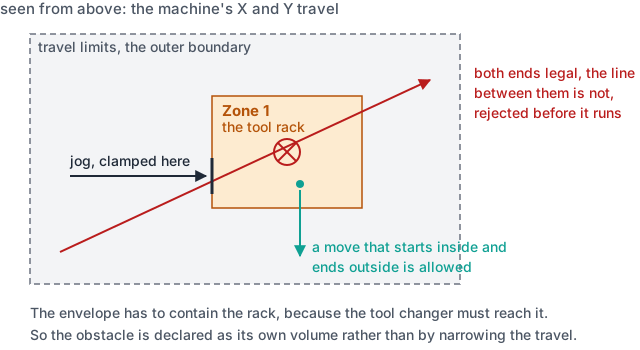
A travel limit is the outer boundary of where the machine may go. It cannot describe a tool rack standing in the middle of that boundary, because the envelope has to contain the rack: the tool changer must reach it. The obstacle is inside the permitted volume, not outside it.
A protection zone is that obstacle, declared as a volume the machine may not enter.
What a zone is
Section titled “What a zone is”An axis-aligned box in machine coordinates, given as a minimum and a maximum on X, Y and
Z, with its own Enabled. They are set on the channel, under
Settings → Protection Zones.
| Field | What to enter | Unit |
|---|---|---|
Lower Corner (Min) | X, Y and Z of the low corner of the obstacle, in machine coordinates | mm |
Upper Corner (Max) | X, Y and Z of the high corner | mm |
Enabled | whether this zone is armed | none |
Add Zone starts another one. The name beside it labels the row in the IDE and in the
messages the IDE itself raises about the configuration; the machine does not report it.
Machine coordinates, not work coordinates: the rack does not move when a part zero is set. A box whose minimum is not below its maximum on every axis is not a volume, and it is refused rather than stored.
What happens when a move would enter one
Section titled “What happens when a move would enter one”| Move | What the control does |
|---|---|
| Programmed | the block that would enter the zone is rejected before it runs |
| Jog | the axis is clamped at the zone face and stops there |
A programmed move is checked on the volume it sweeps, not on its endpoints, so a move whose start and end are both legal is still rejected when the straight line between them crosses the zone.
Jog binds separately, because a manual move never reaches the check above. One axis is clamped at a time and the others are read where they stand. If a linear axis position cannot be read, the jogged axis freezes where it is rather than being let through. An armed zone that cannot be evaluated must not behave like one that cleared the move.
A move that starts inside a zone is allowed as long as it ends outside it. A zone narrowed after it was first authored, a changed home offset, or a machine pushed in by hand would otherwise reject the very move that recovers from it.
Jog is deliberately the stricter of the two: sliding along a zone face is refused for the axis entering it, while the same geometry passes as a programmed move. Where a zone face sits exactly on a travel limit, an axis parked on that limit would otherwise have a zero-width way around the whole zone.
Standing a zone down
Section titled “Standing a zone down”Zones start armed. G22 arms them and G23 stands them down.
G23 is refused from a part program. Only a protected builder macro may switch
obstacle protection off, and only for as long as that macro runs. A tool change reaching
into the rack is the case it exists for. A part program that could disarm a zone would
make the zone advisory rather than a guarantee.
What a zone does not cover
Section titled “What a zone does not cover”- Moves under tool centre point control. A zone is a volume in Cartesian machine
space, which the path is not in while
G43.4,G43.5,G43.8orG43.9is active, so the check stands down for the duration. Keep tool centre point work clear of the obstacles by program, and switch it off before a move that approaches one. - The tool body. The check follows the gauge point, the path the spindle nose is on, not a long tool hanging below it. A tool can reach into a zone the gauge point clears, so author the zone with the longest tool in mind, or keep the retract height above the obstacle.
- Rotary axes. A zone is bounded on X, Y and Z. Jogging a rotary axis is not clamped against one.
- Anything that is not a box. A zone is axis-aligned. A round or angled obstacle is declared as the box that contains it.
- Anything that moves. A zone sits at fixed machine coordinates. A tailstock that is wound along the bed is only protected where its zone says it is.
Where to go next
Section titled “Where to go next”- Axes & Channels: travel limits, and the rest of the channel’s settings.
- G & M Code List:
G22andG23.